
How To Repair Corrupt(damage) Memory Card or Pen Drive in Hindi? नमस्कार दोस्तों आज में आप लोगों के लिए एक ऐसी जानकारी लेकर आया हूँ जिसको जानने के लिए हर कोई इंटरनेट पर Search करता रहता है लेकिन उसको Proper Information नहीं मिल पाती है जी हाँ दोस्तों आज में आपको बताने वाला हूँ की Corrupted Memory Card ko repair kaise kare, ख़राब चिप को ठीक कैसे करते हैं इत्यादि।
अक्सर हमारे Memory Card में Virus आने की वजह से वह format नहीं हो पाता है न ही Mobile में show होता है उस समय बहुत ही ज्यादा दिमाग ख़राब होता है और हम मेमोरी कार्ड फेंक देते हैं या तोड़ देते हैं लेकिन दोस्तों क्या आपको पता है की अगर आप चाहे तोह वह Memory Card repair हो सकता है जी हाँ दोस्तों Internet पर एक ऐसी Trick है जिसके जरिये किसी भी ख़राब Memory Card को Repair किया जा सकता है आज में आपको उसी Trick के जरिये मेमोरी कार्ड ठीक करने की जानकारी दूंगा जो 100% Working है।
तोह चलिए दोस्तों अब ज्यादा समय न लेते हुए सीधे उस जानकारी की और चलते हैं जिसके लिए आप सभी बहुत दिनों से Wait कर रहे हैं। ख़राब मेमोरी कार्ड ठीक कैसे करें?
ख़राब Pen Drive या Memory Card ठीक कैसे करें पूरी जानकारी
दोस्तों में जो Trick बताने वाला हूँ उसको Follow करने के लिए आपके पास Laptop/Computer होना चाहिए अन्यथा आप इस Trick का प्रयोग नहीं कर पाओगे याद रहे आप इस Trick को सिर्फ Window 7 में ही Use कर सकते हैं दूसरी Window के लिए दूसरी Settings available हैं पर आप इन settings को भी एक बार चेक करके देख सकते हैं तोह चलिए अब शुरू करते हैं।
Step 1. सबसे पहले तोह आप अपने laptop में ख़राब वाला SD Card या Pen Drive लगाए
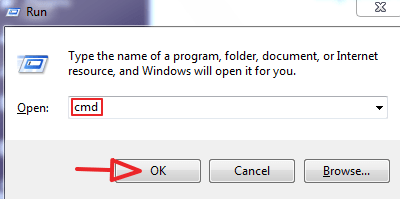
Step 2. अब Window Key + R का बटन दबाएं और CMD लिखकर OK करें
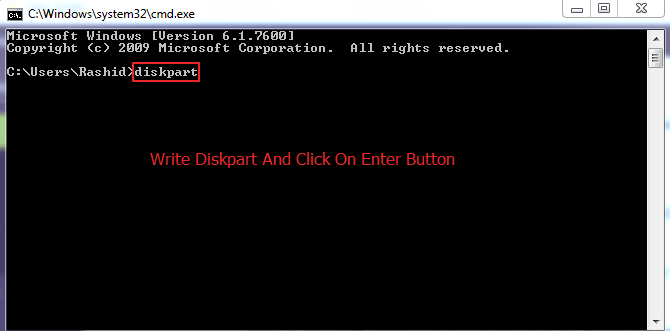
Step 3. अब आपके सामने Command Prompt का ऑप्शन खुल जाएगा वहां पर Diskpart लिखें और Enter का बटन दबाएं
Step 4. जैसे ही Enter पर क्लिक करेंगे तब आपके सामने Diskpart का अलग Command prompt खोलने की permission मांगी जायेगी वहां पर आप Ok पर क्लिक कर दें
Step 5. अब जो दूसरा Command Prompt ओपन हुआ है उसमे आपको नीचे दी गयी Settings करनी हैं
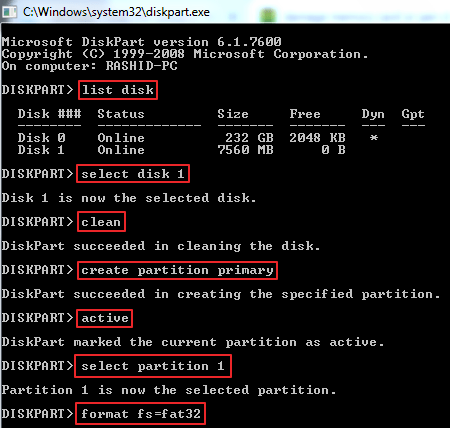
- List disk लिखें और Enter पर क्लिक करें
- अब Select disk 1 लिखें और Enter का बटन दबाएं
- अब आप Clean टाइप करें और Enter करें
- उसके बाद Create Partition Primary लिखें और Enter कर दें
- अब Active लिखकर Enter दबाएं
- अब Select partition 1 लिखकर Enter पर क्लिक करें
- अब Format fs=fat32 लिखें और Enter का बटन दबाएं
- अब आपका Memory Card ठीक हो चुका है अब आप Exit लिखें और Enter के बटन पर क्लिक कर दें
तोह दोस्तों इस तरह आप किसी भी ख़राब SD Card को ठीक कर सकते हो।
ये जरूर पढ़ें >>
- UP Board Original Marksheet download kaise kare
- Website ke
liye 3d logo kaise banaye - Vigo Video se video download kaise kare
- Aadhar Card status check kaise kare
- NGO Kya hai poori
janka ri
उम्मीद है आपको ये पोस्ट बहुत पसंद आयी होगी प्लीज इसको ज्यादा से ज्यादा शेयर करें और अगर चिप सही करने में कोई दिक्कत हो तोह कमेंट में बताये।


बहुत ही कमाल का पोस्ट लिखा है आपने
कमेंट करने के लिए शुक्रिया मुझे उम्मीद है की Future में भी आपको ऐसी ही जानकारी देता रहूँगा
उपयोगी पोस्ट भाई ,
जानकारी के लिए धन्यवाद !
कमेंट करने के लिए शुक्रिया बस ऐसे ही सपोर्ट करते रहिये