
हर कोई चाहता है की उसका Mobile या Laptop कुछ अलग(Different) दिखाई दे ताकि देखने में Interesting लगे आज की इस पोस्ट में आपको ऐसा ही कुछ बताने वाला हूँ। आज आप सीखेंगे की Window 7 में Taskbar Auto Hide Enable कैसे करें।
किसी भी चीज को एक जैसा look में इस्तेमाल करते – करते दिल भर जाता है इसी तरह Laptop भी एक जैसे Interface में कुछ दिनों इस्तेमाल करने पर बुरा लगने लगता है इसलिए हमे अपने लैपटॉप का Look change करते रहना चाहिए ताकि उसको Use करते हुए मज़ा आये।
बहुत से लोग Taskbar को नहीं जानते दोस्तों Window में सबसे नीचे जो bar होता है उसको Taskbar कहते हैं जैसे की आप नीचे दिए गए फोटो में देख सकते हैं।

चलिए दोस्तों ज्यादा टाइम न लेते हुए सीधे ये जानते हैं की How To Enable Auto Hide Taskbar On Window 7
Window 7 में Taskbar को Auto Hide कैसे करें
ये बहुत ही सिंपल सा काम है सिर्फ 2 step में आप ये कर सकते हैं चलिए नीचे जान लेते हैं >>
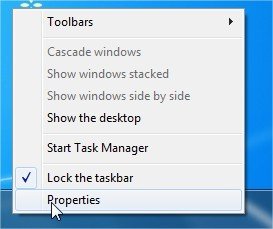
Step 1. सबसे पहले आप Taskbar पर Right click करके Properties में जाइये
Step 2. अब Auto-hide the taskbar पर tick करके Ok पर क्लिक कर दीजिये
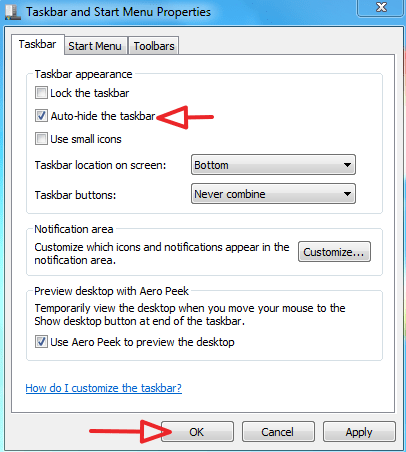
तोह दोस्तों इस तरह आप Window 7 में Taskbar को Hide कर सकते हैं। अब आपके Computer पर Full wallpaper दिखेगा और जब भी आप Mouse Pointer को नीचे लाएंगे तोह Taskbar show हो जाएगा।
Ye Jaroor Padhe >>
- Mobile se computer me internet kaise chalaye
- English ko hindi me translate kaise kare
- PC Games kahan se download kare
- Pen Drive ko bootable kaise banaye
उम्मीद है आपको ये जानकारी बहुत पसंद आयी होगी और अगर कोई Confusion हो तोह नीचे comment box में पूछ सकते हैं।
पोस्ट पसंद आये तोह शेयर जरूर करें




You are doing Too Good Please also check My Website
thanks for comment keep visit