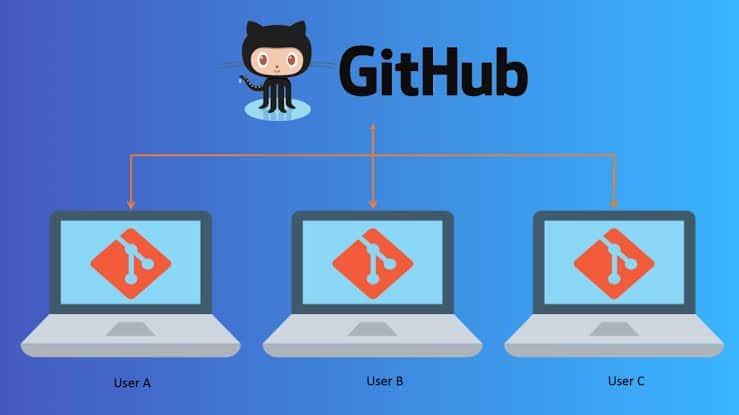
For software engineers, source control is second nature. For data scientists, however, version control often falls by the wayside—resulting in directory clutter like
model_v1_final_FINAL.py or lost experimental metrics.Data science presents unique version control challenges: non-linear workflows, binary Jupyter Notebook outputs, non-text model artifacts, and multi-gigabyte datasets. Applying version control principles specifically adapted for data science transforms chaotic experimental scripts into reproducible, collaborative projects.
1. The Data Science Git Architecture
Unlike standard software development, a complete data science repository must manage three distinct layers: code, data/models, and execution states.
                           ┌─────────────────────────────────────────┐
                           │          DATA SCIENCE REPOSITORY        │
                           └────────────────────┬────────────────────┘
                                                │
         ┌──────────────────────────────────────┼──────────────────────────────────────┐
         ▼                                      ▼                                      ▼
┌──────────────────┐                  ┌──────────────────┐                  ┌──────────────────┐
│ 1. Code Base     │                  │ 2. Data & Models │                  │ 3. Notebooks     │
│ Managed By: Git  │                  │ Managed By: DVC  │                  │ Managed By:      │
│ • Scripts (.py)  │                  │ • Raw CSVs/Parquet│                  │   Jupytext /     │
│ • Pipelines      │                  │ • Trained Models │                  │   Git Filters    │
│ • Config files   │                  │   (.pkl, .onnx)  │                  │ • Stripped .ipynb│
└──────────────────┘                  └──────────────────┘                  └──────────────────┘
2. Setting Up a Proper Data Science .gitignore
Git is optimized for tracking text-based code changes. Tracking massive binary files (like raw datasets or weights files) directly in Git inflates the repository size and severely slows down
git pull and git push operations.Create a robust
.gitignore file at the root of your project immediately after running git init:Code snippet
# Data directories (Never commit raw or processed datasets to Git)
data/
*.csv
*.parquet
*.sqlite

# Model checkpoints & serialized artifacts
models/
*.pkl
*.h5
*.pt
*.onnx

# Jupyter Notebook checkpoints & local environments
.ipynb_checkpoints/
__pycache__/
.venv/
venv/
env/

# Environment configurations containing private API credentials
.env
config/secrets.yaml
3. Essential Git Command Workflow
Python
# 1. Initialize repository and connect to GitHub remote
git init
git remote add origin https://github.com/username/ds-project.aspx

# 2. Create and switch to a feature branch for experiment isolation
git checkout -b feature/xgboost-baseline

# 3. Stage relevant code modifications
git add src/train_model.py config/params.yaml

# 4. Commit changes with a clear, descriptive message
git commit -m "feat: implement XGBoost training pipeline with hyperparameter logging"

# 5. Push feature branch to GitHub for peer review
git push -u origin feature/xgboost-baseline
4. Branching Strategies for Machine Learning Workflows
Data science requires frequent hypothesis testing and parallel experimentation. Operating entirely on the
main branch leads to unstable pipelines and broken baseline models.main ─────────────────────────●────────────────────────► (Production Model)
▲
│ (Pull Request Merge)
feature/ ──────●─────────●─────────┘
experiment │ │
(XGBoost) └─────────┼──────────● (Abandon failed branch)
│
feature/ └──●───────● (Feature Engineering)
features
-
main/masterBranch: Contains stable, production-tested pipeline code, environment specifications, and reproducible training scripts. -
feature/Branches: Used for implementing concrete codebase updates (e.g., adding a new feature pipeline, refactoring preprocessing routines, or writing unit tests). -
experiment/Branches: Dedicated to hypothesis testing and model exploration (e.g.,experiment/resnet-vs-efficientnet). If an experiment yields poor performance, simply abandon or archive the branch without polluting main execution logic.
5. Handling Data & Model Artifacts with DVC (Data Version Control)
Since Git shouldn’t store large data files directly, pair Git with DVC (Data Version Control). DVC works alongside Git by tracking dataset and model file hashes in tiny
.dvc metadata text files, while pushing the actual binary payloads to remote storage (S3, Google Cloud Storage, or Azure Blob).Bash
# Initialize DVC inside your Git repository
dvc init

# Track a large dataset with DVC instead of Git
dvc add data/raw_sales.csv

# Git now tracks raw_sales.csv.dvc (a light pointer file), while Git ignores raw_sales.csv
git add data/raw_sales.csv.dvc .gitignore
git commit -m "track: add raw sales dataset v1 via DVC"

# Push the actual data file to remote cloud storage
dvc remote add -d myremote s3://my-ds-bucket/dvcstore
dvc push
6. Managing Jupyter Notebooks in Git
Because
.ipynb files store output metadata and execution counts in complex JSON format, standard git diff commands produce unreadable noise during code reviews.Recommended Notebook Solutions
-
Strip Outputs Before Committing: Use pre-commit hooks or tools like
nbstripoutto clear visual plots and execution counts automatically before staging:Bashpip install nbstripout nbstripout --install # Automatically strips outputs on 'git commit' -
Pair with Jupytext: Convert notebooks into lightweight
.pyscripts automatically using Jupytext, allowing Git to diff plain Python code line-by-line.
Best Practice Checklist for Data Science Version Control
| Task | Standard Practice |
| Raw Datasets | Track via DVC, store in cloud buckets, and add to .gitignore. |
Model Weights (.pkl, .pt) |
Track via DVC or a model registry (MLflow / Weights & Biases). |
| Environment Specs | Track environment.yml or requirements.txt directly in Git. |
| Credentials & Keys | Store strictly in .env files; never commit to Git. |
| Notebooks | Strip binary outputs using nbstripout or convert via Jupytext. |
| Experiment Code | Isolate inside dedicated experiment/ feature branches. |
Key Takeaway
Git handles your pipeline code, DVC tracks your data and models, and
nbstripout keeps your notebooks clean. Adopting this unified version control framework guarantees that every model evaluation, plot, and metric in your data science project is fully reproducible and team-ready.