Hello Guys, Welcome On Hindi Me Gyaan, आजके इस लेख मे हम बात करेंगे की Paytm Password Reset कैसे करते हैं (How To Reset Paytm Password In Hindi) क्या आप अपने Paytm Account का पासवर्ड भूल गए हैं और Login नहीं हो पा रहे हैं तो अब आपको परेशान होने की जरूरत नहीं है क्यूंकी आज हम आप लोगों को पासवर्ड रेसेट करने का आसान तरीका बताने वाले हैं।
दोस्तों आजकल हमारे इतने सारे Accounts हैं की उनका Password याद रखना बहुत मुश्किल काम है लेकिन याद होना भी जरूरी है। अगर पासवर्ड भूल जाएँ तो उसको Reset करने का भी ऑप्शन होता है जैसे Paytm Password Reset करने का तरीका भी उपलब्ध है आज की इस पोस्ट मे हम इसी बारे मे discuss करेंगे की Paytm Password कैसे बदलें (How To Change Paytm Password In Hindi)
तो चलिये दोस्तों अब ज्यादा समय न लेते हुए सीधे उस जानकारी की और चलते हैं जिसका आप सभी को बेसबरी से इंतज़ार है आइए जानते हैं की Paytm Password Reset कैसे होता है?
How To Reset Paytm Password In Hindi ( पेटीएम पासवर्ड भूल गए जाने कैसे बदलें )
दोस्तों Paytm का Password Reset करना बहुत ही आसान है बस आपके पास वो मोबाइल नंबर होना चाहिए जिसपर आपका account बना हुआ है चलिये इस जानकारी को विस्तार से हासिल करते हैं।
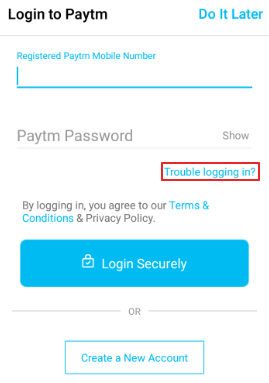
Step 1. सबसे पहले आप अपने मोबाइल मे Paytm App Open करिए। आपके सामने Login करने का ऑप्शन आएगा लेकिन आप तो पासवर्ड भूल चुके हैं इसलिए Trouble Logging In? पर क्लिक करें
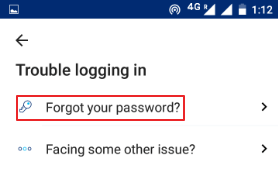
Step 2. अब आपके सामने 2 ऑप्शन आएंगे वहाँ पर आप Forgot Your Password? पर क्लिक करें
Step 3. अब आपके सामने एक Number आएगा उसपर उस नंबर से कॉल करे जिसका password आप reset करना चाहते है
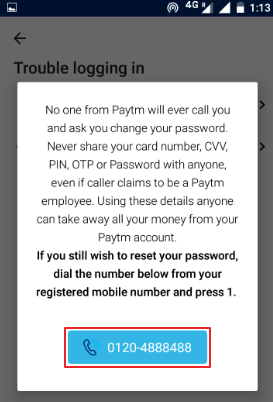
Step 4. जब आप कॉल करेंगे तब वो पहले Language चुनने को बोलेगा उसके बाद Password Reset करने लिए 1 दबाने को कहेगा उसको Follow करें
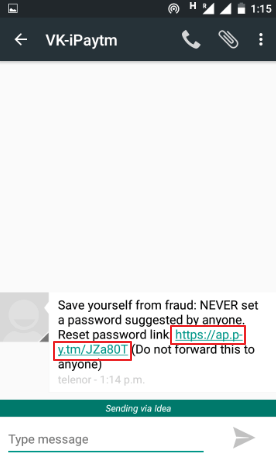
Step 5. जैसे ही आप 1 Press करेंगे आपके मोबाइल नंबर पर एक message आएगा उसमे Link दिया गया होगा उसपर क्लिक करके Browser मे open करें
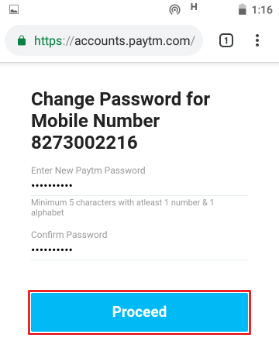
Step 6. अब आपके सामने New Password डालने का ऑप्शन आएगा वहाँ 2 बार पासवर्ड डालें और Proceed पर क्लिक कर दें
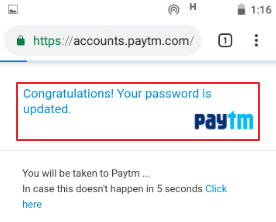
Step 7. Congratulations आपका पासवर्ड reset हो चुका है अब आप Login कर सकते हैं जैसा की आप नीचे दिये गए फोटो मे देख सकते हैं
आजकी इस पोस्ट मे हमने आप लोगों को बताया की Paytm का Password Reset कैसे करते हैं उम्मीद है आपको ये लेख बहुत पसंद आया होगा अगर फिर भी कुछ समझने मे परेशानी हो तो नीचे कमेंट बॉक्स मे हमे बताएं हम 24 hours आपकी मदद के लिए हाजिर हैं।
अगर पोस्ट पसंद आए तो Social Media पर शेर जरूर करें!