
Blogger Blog को Fully Search Engine Optimized कैसे करें

how to improve search engine ranking fastly

Blogspot Blog को Full Search Engine Optimized / Optimization कैसे बनाएँ, SEO कैसे करें, How to Use Meta Description in Blogspot Blog In Hindi

how to improve search engine ranking fastly

हैलो दोस्तों आजका लेख Blogspot Users के लिए बहुत ही helpful है क्यूंकी यहाँ हम आपको बताएँगे की Blogger Blog को पूरा Search Engine Optimized कैसे बनाएँ। ये तो आपको मालूम ही होगा की अगर आपके Blog की SEO Setting सही होगी तो आपका हर Article अच्छी Rank पर आएगा इसलिए दोस्तों ब्लॉग बनाने के बाद सबसे पहले उसके SEO को Full Optimized जरूर कर लें।

दोस्तों Blogging करने के लिए ज़्यादातर लोग WordPress और Blogspot का इस्तेमाल करते हैं। WordPress मे आसानी से Plugin install करके Search Engine Optimized कर सकते हैं लेकिन Blogger यानि Blogspot मे ऐसा नहीं है इसमे Coding मे जाकर SEO Settings करना पड़ती है लेकिन अब आपको ज्यादा परेशान होने की जरूरत नहीं है क्यूंकी यहाँ पर मे आपको बताऊंगा की Blogger Blog को Fully Search Engine Optimized कैसे बनाएँ

Read Also – ब्लॉग क्यूँ बनाएँ ? ब्लॉगिंग करने के फायदे

Blogger Blog का SEO बिलकुल सही कैसे करें | Blogspot Blog मे Meta Description कैसे Add करें

दोस्तों अगर आप सही ढंग से अपने ब्लॉगर ब्लॉग के SEO को Better बनाना चाहते हो तो नीचे दिये गए Steps को Follow करके अपने ब्लॉग मे Meta Description जरूर add कर लें।

नोट – याद रहे किसी भी प्रकार की Coding करने से पहले अपने ब्लॉग का Backup जरूर ले लें कहीं कोई गड़बड़ हो गयी तो आपकी सारी मेहनत खराब हो सकती है।

Step 1. सबसे पहले Blogger.com पर जाकर अपने Blog के Dashboard पर जाएँ

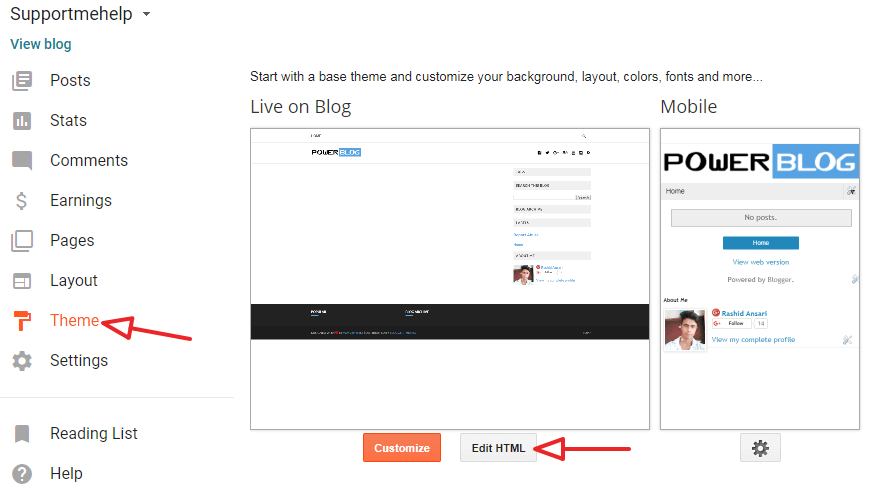
Step 2. अब Theme >> Edit HTML पर क्लिक करें
how to improve search engine ranking fastly

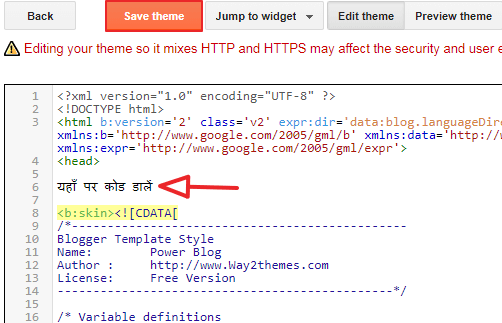
Step 3. अब आपके सामने HTML Coding show होगी वहाँ पर आपको <head> और <b:skin><![CDATA[ के बीच के पूरे कोड को डिलीट कर दें और वहाँ पर नीचे दिये गए Code को Copy करके Paste करें और Save Theme पर क्लिक कर दें।
<b:include data=’blog’ name=’all-head-content’/>    
<b:if cond=’data:blog.pageType == “index”‘>    
<title><data:blog.pageTitle/></title>    
<b:else/>    
<title><data:blog.pageName/> – <data:blog.title/></title>    
</b:if>    
<meta content=’Blog Ke Baare Me Ki Blog Par Kya Share Kiya Jaata Hai!’ name=’description’/>    
<meta content=’Yahan Keywords Daale!’ name=’keywords’/>    
<meta content=’Apna Naam Daale!’ name=’Author’/>    
<meta content=’Apna Email Address Daale!’ name=’Email’/>    
<meta content=’document’ name=’resource-type’/>    
<meta content=’all’ name=’audience’/>    
<meta content=’general’ name=’rating’/>    
<meta content=’all’ name=’robots’/>    
<meta content=’index, follow’ name=’robots’/>    
<meta content=’id’ name=’language’/>    
<meta content=’id’ name=’geo.country’/>    
<meta content=’global’ name=’distribution’/>    
<meta content=’1 days’ name=’revisit-after’/>    
<meta content=’Indonesia’ name=’geo.placename’/>
how to improve search engine ranking fastly

नोट – दोस्तों आपको ऊपर का कोड <head> और <b:skin><![CDATA[ के बीच मे add करना है

ये जरूर पढ़ें >>

तो दोस्तों अब आप जान चुके हैं की Blog का Full SEO कैसे करें उम्मीद है आपको ये जानकारी बहुत पसंद आई होगी प्लीज इसको ज्यादा से ज्यादा शेयर करें और अगर कोई Doubt हो तो कमेंट मे बताएं।

About Adi Status

Adi Satus is a passionate financial writer with a keen interest in the ever-evolving world of loans, insurance, technology, and cryptocurrency. With years of experience researching and writing on a broad range of financial topics, Hindi Me Gyaan aims to simplify complex concepts and make them accessible for readers. Whether you're looking to secure a loan, navigate the world of insurance, explore the latest tech trends, or understand the intricacies of cryptocurrency, Hindi Me Gyaan provides expert insights and practical advice to help you make informed decisions. Always staying updated with the latest developments, Hindi Me Gyaan is dedicated to bringing you the most relevant, timely, and useful information to guide you on your financial journey.

View all posts by Adi Status →

4 Comments on “Blogger Blog को Fully Search Engine Optimized कैसे करें”

  1. Hurrah! Ӏn the end I got а web site from where I be able to truly oƅtain valuable facts concerning my stuԀy and knowledge.

Leave a Reply

Your email address will not be published. Required fields are marked *